The Adapter Pattern for C# Developers
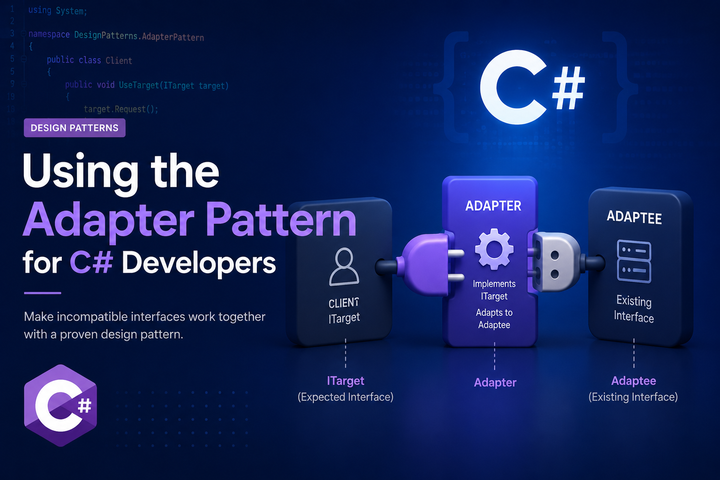
The Adapter pattern is one of the most practical patterns you’ll use. It lets you make two incompatible interfaces work together. If you’ve ever wrapped a third-party library to fit your application’s conventions, you’ve already used an adapter.
Let’s Define the Pattern
An adapter is a class that translates one interface into another. It wraps an existing class and exposes a different interface that your code expects. The adapter handles the translation between what you have and what you need.
The key idea is compatibility. You have code that expects interface A. You have a class that implements interface B. The adapter sits in the middle and makes B look like A.
What an adapter is not: it’s not about adding functionality. It’s about making existing functionality accessible through a different interface. The wrapped class still does the same work. The adapter just changes how you talk to it.
The Problem It Solves
Imagine you’re building an application that sends SMS messages. You define a clean interface:
public interface ISmsService
{
    Task<SmsResult> SendAsync(string phoneNumber, string message);
}
Your application code uses this interface everywhere. Then you integrate with a third-party SMS provider. Their SDK looks like this:
public class TwilioClient
{
    public MessageResource Create(CreateMessageOptions options)
    {
        // Twilio's actual implementation
    }
}
The signatures don’t match. The Twilio client uses different parameter types, different return types, and a different method name. You could change your interface to match Twilio, but then:
- Your code becomes coupled to Twilio’s API
- Switching providers means changing your interface and all call sites
- Testing becomes harder because you’re tied to their types
Core Structure and Roles
The Adapter pattern has three parts:
Target interface: The interface your application expects.
public interface ISmsService
{
    Task<SmsResult> SendAsync(string phoneNumber, string message);
}
Adaptee: The existing class with an incompatible interface (often a third-party library).
// This is Twilio's class - you don't control it
public class TwilioClient
{
    public MessageResource Create(CreateMessageOptions options) { ... }
}
Adapter: The class that implements the target interface and wraps the adaptee.
public class TwilioSmsAdapter : ISmsService
{
    private readonly TwilioClient _client;
    private readonly string _fromNumber;

    public TwilioSmsAdapter(TwilioClient client, string fromNumber)
    {
        _client = client;
        _fromNumber = fromNumber;
    }

    public Task<SmsResult> SendAsync(string phoneNumber, string message)
    {
        var options = new CreateMessageOptions(new PhoneNumber(phoneNumber))
        {
            From = new PhoneNumber(_fromNumber),
            Body = message
        };

        var result = _client.Create(options);

        return Task.FromResult(new SmsResult
        {
            Success = result.Status != MessageResource.StatusEnum.Failed,
            MessageId = result.Sid
        });
    }
}
Now your application code works with ISmsService. It doesn’t know or care that Twilio is behind it.
Adapter vs Similar Patterns
Adapter vs Facade: A facade simplifies a complex interface. An adapter converts one interface to another. A facade might combine multiple calls into one; an adapter typically wraps a single class and changes its shape.
Adapter vs Decorator: A decorator adds behavior while keeping the same interface. An adapter changes the interface without adding behavior. If the input and output interfaces are the same, it’s probably a decorator. If they’re different, it’s an adapter.
Adapter vs Proxy: A proxy controls access to an object while keeping the same interface. An adapter changes the interface. A proxy might add lazy loading, caching, or access control. An adapter just translates.
Adapter vs Wrapper: “Wrapper” is a general term. Adapters, decorators, and proxies are all wrappers. When someone says “wrapper” without being specific, they often mean an adapter.
Adapter with Dependency Injection
Adapters fit naturally into DI. You register the adapter as the implementation of your interface:
services.AddSingleton<TwilioClient>();
services.AddScoped<ISmsService, TwilioSmsAdapter>();
If you have multiple adapters (say, for different SMS providers), you might use a factory or keyed services:
services.AddScoped<TwilioSmsAdapter>();
services.AddScoped<SendGridSmsAdapter>();

services.AddScoped<ISmsService>(sp =>
{
    var config = sp.GetRequiredService<IConfiguration>();
    var provider = config["SmsProvider"];

    return provider switch
    {
        "Twilio" => sp.GetRequiredService<TwilioSmsAdapter>(),
        "SendGrid" => sp.GetRequiredService<SendGridSmsAdapter>(),
        _ => throw new InvalidOperationException($"Unknown SMS provider: {provider}")
    };
});
The rest of your application just injects ISmsService and doesn’t care which provider is configured.
Testing with Adapters
Adapters make testing easier in two ways.
Testing your application code: You mock the target interface, not the third-party SDK. Much simpler.
[Fact]
public async Task NotifyUser_SendsSms()
{
    var mockSms = new Mock<ISmsService>();
    mockSms
        .Setup(x => x.SendAsync(It.IsAny<string>(), It.IsAny<string>()))
        .ReturnsAsync(new SmsResult { Success = true });

    var service = new NotificationService(mockSms.Object);

    await service.NotifyUser("+15551234567", "Your order shipped!");

    mockSms.Verify(x => x.SendAsync("+15551234567", "Your order shipped!"), Times.Once);
}
Testing the adapter itself: You can test that the adapter correctly translates between your interface and the third-party SDK. This is where you verify the mapping logic.
[Fact]
public async Task SendAsync_CreatesTwilioMessageWithCorrectOptions()
{
    var mockTwilio = new Mock<TwilioClient>();
    var adapter = new TwilioSmsAdapter(mockTwilio.Object, "+15559999999");

    await adapter.SendAsync("+15551234567", "Hello");

    mockTwilio.Verify(x => x.Create(
        It.Is<CreateMessageOptions>(o =>
            o.To.ToString() == "+15551234567" &&
            o.Body == "Hello")));
}
Common Pitfalls and Code Smells
Adapters that add business logic: An adapter should translate, not make decisions. If you’re adding validation, calculations, or business rules, that logic belongs elsewhere.
Leaky adapters: If your adapter exposes types from the adaptee in its public interface, you haven’t fully isolated the dependency. Keep the adaptee’s types internal to the adapter.
One adapter per method: If you find yourself creating a new adapter class for every method on a third-party SDK, step back. You might need a single adapter with multiple methods, or you might be over-abstracting.
Adapters that don’t handle errors: Third-party SDKs throw their own exceptions. Your adapter should catch those and translate them into your application’s error handling approach (exceptions, result types, whatever you use).
public async Task<SmsResult> SendAsync(string phoneNumber, string message)
{
    try
    {
        var result = await _client.SendAsync(phoneNumber, message);
        return SmsResult.Success(result.Id);
    }
    catch (TwilioException ex)
    {
        return SmsResult.Failed(ex.Message);
    }
}
Not adapting configuration: If the third-party SDK needs configuration (API keys, endpoints, timeouts), the adapter should handle that. Don’t leak configuration concerns to callers.
When Not to Use an Adapter
When the interfaces already match: If the third-party SDK already fits your needs, wrapping it adds indirection without benefit.
For internal code you control: If you own both sides of the interface mismatch, consider changing one of them instead of adding an adapter.
When you’ll never switch implementations: If you’re absolutely certain you’ll never change providers, the isolation benefit is reduced. But be honest with yourself about how certain “absolutely certain” really is.
For trivial translations: If the adapter is just renaming a method with no other changes, it might not be worth the extra class.
Practical Guidelines
A few things to keep in mind:
- Name adapters after what they adapt.
TwilioSmsAdapterorSendGridSmsAdaptermakes the purpose clear. - Keep adapters focused. One adapter per third-party integration. Don’t create a mega-adapter that wraps multiple unrelated SDKs.
- Handle the adaptee’s quirks inside the adapter. If Twilio uses different status codes, the adapter normalizes them.
- Define your target interface based on your needs, not the adaptee. Design the interface you wish you had, then write adapters to make it work.
- Consider async from the start. Most third-party integrations are I/O bound. Design your target interface with
Taskreturn types even if your first adapter wraps a synchronous SDK.
The Adapter pattern is a straightforward way to isolate your code from external dependencies. It keeps third-party quirks contained, makes testing easier, and gives you the flexibility to swap implementations later. Use it whenever you integrate with something you don’t control.

Alan P. Barber
Software Developer, Computer Scientist, Scrum Master, & Crohn’s Disease Fighter
I specialize in Software Development with a focus on Architecture and Design.