The Facade Pattern for C# Developers
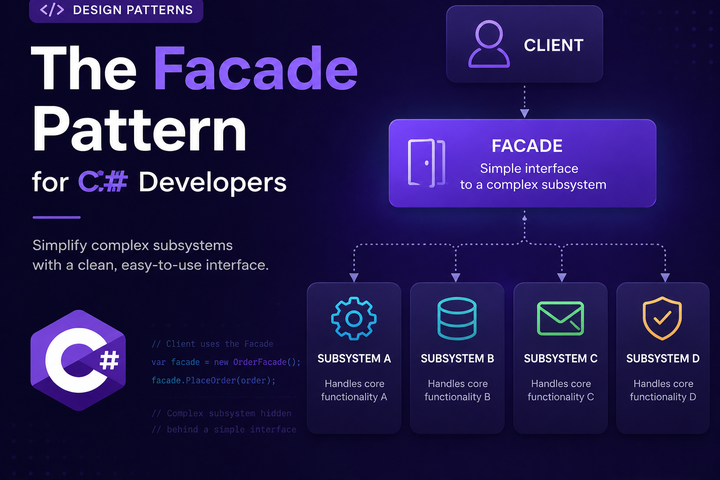
The Facade pattern is one of the simpler patterns to understand, but it’s also one of the most useful. It gives you a clean, simple interface to a messy or complex subsystem. If you’ve ever wrapped a bunch of related calls behind a single method to make life easier for the caller, you’ve already used a facade.
Let’s Define the Pattern
A facade is a class that provides a simplified interface to a larger body of code. It hides the complexity of the subsystem and exposes only what the caller needs.
The key idea is that the facade knows how to coordinate the subsystem, but the caller doesn’t have to. The caller gets a simple API. The messy details stay behind the curtain.
What a facade is not: it’s not about adding new functionality. It’s about making existing functionality easier to use. The subsystem still exists and still works the same way. The facade just provides a friendlier front door.
The Problem It Solves
Imagine you’re building an e-commerce system. Placing an order involves multiple steps:
public class OrderController
{
    public async Task<IActionResult> PlaceOrder(OrderRequest request)
    {
        // Validate inventory
        var inventory = await _inventoryService.CheckAvailability(request.Items);
        if (!inventory.AllAvailable)
            return BadRequest("Some items are out of stock");

        // Calculate pricing
        var pricing = await _pricingService.Calculate(request.Items, request.CustomerId);

        // Apply discounts
        var discounts = await _discountService.GetApplicableDiscounts(request.CustomerId);
        var finalPrice = _discountService.Apply(pricing, discounts);

        // Process payment
        var payment = await _paymentService.Charge(request.PaymentMethod, finalPrice);
        if (!payment.Success)
            return BadRequest("Payment failed");

        // Create order
        var order = await _orderService.Create(request, finalPrice, payment.TransactionId);

        // Send confirmation
        await _emailService.SendOrderConfirmation(order);

        // Update inventory
        await _inventoryService.Reserve(request.Items);

        return Ok(order);
    }
}
This controller knows way too much. It’s coordinating six different services, handling their interactions, and managing the workflow. Every controller that needs to place an order has to repeat this dance.
The problems:
- The controller is doing orchestration work that doesn’t belong there
- Changes to the order process require editing every place that places orders
- Testing requires mocking six services
- New developers have to understand the entire flow to make changes
Core Structure and Roles
The Facade pattern has two main parts:
Facade: The simplified interface that clients use. It knows how to coordinate the subsystem.
Subsystem classes: The existing classes that do the actual work. They don’t know about the facade and don’t change.
public class OrderFacade
{
    private readonly IInventoryService _inventoryService;
    private readonly IPricingService _pricingService;
    private readonly IDiscountService _discountService;
    private readonly IPaymentService _paymentService;
    private readonly IOrderService _orderService;
    private readonly IEmailService _emailService;

    public OrderFacade(
        IInventoryService inventoryService,
        IPricingService pricingService,
        IDiscountService discountService,
        IPaymentService paymentService,
        IOrderService orderService,
        IEmailService emailService)
    {
        _inventoryService = inventoryService;
        _pricingService = pricingService;
        _discountService = discountService;
        _paymentService = paymentService;
        _orderService = orderService;
        _emailService = emailService;
    }

    public async Task<OrderResult> PlaceOrder(OrderRequest request)
    {
        var inventory = await _inventoryService.CheckAvailability(request.Items);
        if (!inventory.AllAvailable)
            return OrderResult.Failed("Some items are out of stock");

        var pricing = await _pricingService.Calculate(request.Items, request.CustomerId);
        var discounts = await _discountService.GetApplicableDiscounts(request.CustomerId);
        var finalPrice = _discountService.Apply(pricing, discounts);

        var payment = await _paymentService.Charge(request.PaymentMethod, finalPrice);
        if (!payment.Success)
            return OrderResult.Failed("Payment failed");

        var order = await _orderService.Create(request, finalPrice, payment.TransactionId);
        await _emailService.SendOrderConfirmation(order);
        await _inventoryService.Reserve(request.Items);

        return OrderResult.Success(order);
    }
}
Now the controller becomes simple:
public class OrderController
{
    private readonly OrderFacade _orderFacade;

    public OrderController(OrderFacade orderFacade)
    {
        _orderFacade = orderFacade;
    }

    public async Task<IActionResult> PlaceOrder(OrderRequest request)
    {
        var result = await _orderFacade.PlaceOrder(request);

        return result.IsSuccess
            ? Ok(result.Order)
            : BadRequest(result.Error);
    }
}
The controller no longer knows or cares about inventory, pricing, discounts, payments, or emails. It just asks the facade to place an order.
When to Reach for a Facade
Facades are useful in several situations:
Simplifying complex subsystems: When you have multiple services that need to work together in a specific sequence, a facade can hide that coordination.
Reducing coupling: Instead of a class depending on five services, it depends on one facade. Changes to the subsystem don’t ripple out to every consumer.
Providing a clean API for external consumers: If you’re building a library or SDK, a facade can give users a simple entry point without exposing internal complexity.
Legacy system integration: When wrapping old code that has a messy API, a facade can present a cleaner interface to the rest of your application.
Facade vs Similar Concepts
Facade vs Adapter: An adapter converts one interface to another. A facade simplifies a complex interface. An adapter is about compatibility; a facade is about convenience.
Facade vs Service Layer: These overlap quite a bit. A service layer often acts as a facade over domain logic and infrastructure. The difference is mostly intent: “service layer” implies a specific architectural role, while “facade” is a general pattern.
Facade vs Mediator: A mediator coordinates communication between objects that know about each other. A facade provides a simple interface to objects that don’t know about the facade. The subsystem classes in a facade don’t change; in a mediator pattern, the colleagues typically reference the mediator.
Facade vs Aggregate Root (DDD): In Domain-Driven Design, an aggregate root controls access to a cluster of domain objects. It’s similar in spirit to a facade but focused on domain invariants rather than simplifying an API.
Facade with Dependency Injection
Facades work naturally with DI. You inject the subsystem dependencies into the facade, then inject the facade where it’s needed.
services.AddScoped<IInventoryService, InventoryService>();
services.AddScoped<IPricingService, PricingService>();
services.AddScoped<IDiscountService, DiscountService>();
services.AddScoped<IPaymentService, PaymentService>();
services.AddScoped<IOrderService, OrderService>();
services.AddScoped<IEmailService, EmailService>();

services.AddScoped<OrderFacade>();
If you want to abstract the facade behind an interface (useful for testing or if you might have multiple implementations):
services.AddScoped<IOrderFacade, OrderFacade>();
The facade itself can have dependencies injected, and it can be injected into controllers, other services, or anywhere else that needs it.
Testing with Facades
Facades can make testing easier or harder depending on how you use them.
Testing the facade itself: You mock the subsystem services and verify the facade coordinates them correctly.
[Fact]
public async Task PlaceOrder_WhenInventoryUnavailable_ReturnsFailure()
{
    var inventoryService = new Mock<IInventoryService>();
    inventoryService
        .Setup(x => x.CheckAvailability(It.IsAny<List<Item>>()))
        .ReturnsAsync(new InventoryResult { AllAvailable = false });

    var facade = new OrderFacade(
        inventoryService.Object,
        Mock.Of<IPricingService>(),
        Mock.Of<IDiscountService>(),
        Mock.Of<IPaymentService>(),
        Mock.Of<IOrderService>(),
        Mock.Of<IEmailService>());

    var result = await facade.PlaceOrder(new OrderRequest());

    Assert.False(result.IsSuccess);
    Assert.Equal("Some items are out of stock", result.Error);
}
Testing consumers of the facade: You mock just the facade, not all the subsystem services. This is much simpler.
[Fact]
public async Task PlaceOrder_WhenSuccessful_ReturnsOk()
{
    var facade = new Mock<IOrderFacade>();
    facade
        .Setup(x => x.PlaceOrder(It.IsAny<OrderRequest>()))
        .ReturnsAsync(OrderResult.Success(new Order()));

    var controller = new OrderController(facade.Object);

    var result = await controller.PlaceOrder(new OrderRequest());

    Assert.IsType<OkObjectResult>(result);
}
This is one of the main benefits. Without the facade, testing the controller would require mocking six services.
Common Pitfalls and Code Smells
Facades that do too much: A facade should simplify, not become a dumping ground. If your facade has 50 methods, it’s probably doing too much. Consider splitting it into multiple focused facades.
Facades that add business logic: A facade should coordinate, not make decisions. If you’re adding validation rules or business logic to the facade, that logic probably belongs in a domain service or the subsystem itself.
Facades that expose subsystem details: If the facade’s return types or parameters leak internal types from the subsystem, you haven’t really hidden the complexity. Define clean DTOs or result types for the facade’s API.
Too many layers of facades: If you have a facade that calls a facade that calls a facade, you’ve created indirection without value. Keep it simple.
Skipping the facade for “just this one call”: If some code bypasses the facade and calls the subsystem directly, you lose the benefits of centralization. Be consistent.
When Not to Use a Facade
Simple subsystems: If the subsystem is already easy to use, a facade adds indirection without benefit.
When callers need fine-grained control: If different callers need to use the subsystem in different ways, a facade that forces one workflow might be too restrictive.
Performance-critical paths: Each layer adds a small overhead. In most cases this doesn’t matter, but if you’re in a tight loop, measure before adding abstractions.
When it’s really just one service: If your “facade” wraps a single service and just forwards calls, it’s not adding value. A facade makes sense when coordinating multiple things.
Practical Guidelines
A few things to keep in mind:
- Name facades after what they do, not what they wrap.
OrderFacadeorOrderingServiceis better thanOrderSubsystemWrapper. - Keep the facade’s API focused. It should expose the operations callers actually need, not every possible combination of subsystem calls.
- Don’t let the facade become a god class. If it’s growing too large, split it by use case or domain area.
- The subsystem should still work without the facade. The facade is a convenience, not a requirement. Other parts of the system might still use the subsystem directly if they need to.
- Consider using an interface for the facade. This makes testing easier and allows for alternative implementations if needed.
The Facade pattern is a straightforward way to tame complexity. It gives callers a simple interface while keeping the messy coordination logic in one place. Use it when you have a complex subsystem that multiple parts of your application need to use, and you want to make their lives easier.

Alan P. Barber
Software Developer, Computer Scientist, Scrum Master, & Crohn’s Disease Fighter
I specialize in Software Development with a focus on Architecture and Design.