The Template Method Pattern for C# Developers
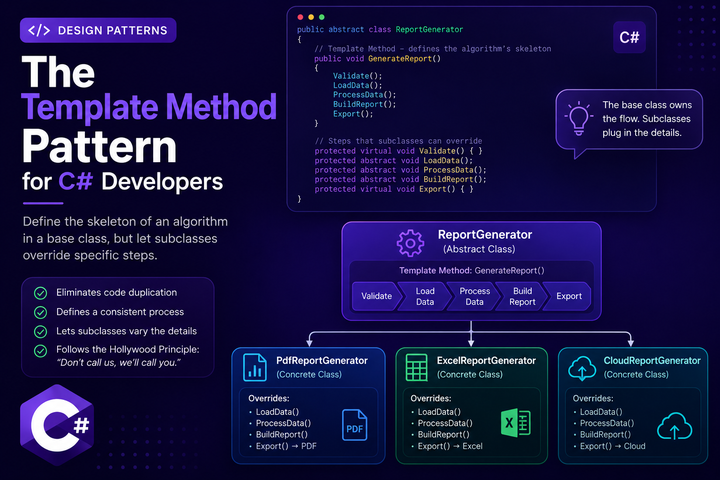
Most report jobs follow the same order. You check the input, load the rows, add up the totals, lay out the report, and send it somewhere. The details change from one format to the next, and most of the steps don’t. The Template Method pattern lets you write the fixed order once, in a base class, and leave the varying steps for subclasses to fill in.
Let’s Define the Pattern
A template method is a method on a base class that lays out an algorithm as a series of steps. It calls other methods in a fixed order. Some of those methods are abstract, so every subclass has to provide its own version. Others are virtual, with a default that a subclass can override if it needs to.
The base class owns the flow. The subclasses own the details. That split is the whole pattern.
What Template Method is not: it’s not a way to swap algorithms while your program is running. The steps are fixed when the base class is written, and you pick the subclass when you create the object. If you want to choose between whole algorithms on the fly, look at Strategy.
The Problem It Solves
Imagine you produce a sales report every week. Sometimes it’s a PDF for the leadership team, sometimes an Excel file for finance, and sometimes a JSON file in cloud storage for another app. The steps are the same each time: check the input file, load the sales rows, add up the totals by region, build the report, and deliver it. Here is a first attempt:
public class ReportService
{
    public void GenerateReport(string format, string sourcePath, string outputPath)
    {
        if (!File.Exists(sourcePath))
            throw new FileNotFoundException("Sales file not found.", sourcePath);

        var totals = new Dictionary<string, decimal>();

        foreach (var line in File.ReadLines(sourcePath).Skip(1))
        {
            var parts = line.Split(',');
            totals[parts[0]] = totals.GetValueOrDefault(parts[0]) + decimal.Parse(parts[1]);
        }

        if (format == "pdf")
        {
            var pdf = new PdfDocument();
            foreach (var (region, total) in totals)
                pdf.AddLine($"{region}: {total:C}");

            File.WriteAllBytes(outputPath, pdf.ToBytes());
        }
        else if (format == "excel")
        {
            using var workbook = new XLWorkbook();
            var sheet = workbook.Worksheets.Add("Summary");

            var row = 1;
            foreach (var (region, total) in totals)
            {
                sheet.Cell(row, 1).Value = region;
                sheet.Cell(row, 2).Value = total;
                row++;
            }

            workbook.SaveAs(outputPath);
        }
        else if (format == "cloud")
        {
            var json = JsonSerializer.SerializeToUtf8Bytes(totals);
            new BlobClient(connectionString, "reports", outputPath).Upload(new MemoryStream(json), overwrite: true);
        }
    }
}
This version is tidy at first. The validation and totals happen once, before the if. But every format’s rendering and delivery now live in one method. Add a fourth format and this method grows again. Test the cloud path and you still have to think about the PDF and Excel branches.
The other common fix is one class per format, each with its own full copy of the validation, loading, and totals. That removes the if chain, but now the flow lives in three places. When the totals logic changes, for example to exclude refunds, you have to update all three copies.
Core Structure
The pattern has two parts: a base class that holds the template method, and subclasses that fill in the steps.
public record SalesRecord(string Region, decimal Amount);

public abstract class ReportGenerator
{
    private readonly string _sourcePath;

    protected ReportGenerator(string sourcePath)
    {
        _sourcePath = sourcePath;
    }

    public void GenerateReport()
    {
        Validate();
        var records = LoadData();
        var totals = ProcessData(records);
        var report = BuildReport(totals);
        Export(report);
    }

    protected virtual void Validate()
    {
        if (!File.Exists(_sourcePath))
            throw new FileNotFoundException("Sales file not found.", _sourcePath);
    }

    protected virtual IEnumerable<SalesRecord> LoadData()
    {
        return File.ReadLines(_sourcePath)
            .Skip(1)
            .Select(line => line.Split(','))
            .Select(parts => new SalesRecord(parts[0], decimal.Parse(parts[1])));
    }

    protected virtual IReadOnlyDictionary<string, decimal> ProcessData(IEnumerable<SalesRecord> records)
    {
        return records
            .GroupBy(r => r.Region)
            .ToDictionary(g => g.Key, g => g.Sum(r => r.Amount));
    }

    protected abstract byte[] BuildReport(IReadOnlyDictionary<string, decimal> totals);

    protected abstract void Export(byte[] report);
}
GenerateReport is the template method. It sets the order: validate, load, process, build, export. Callers only ever call this one method.
Validate, LoadData, and ProcessData are virtual with defaults, since all three formats read the same CSV and total it the same way. BuildReport and Export are abstract because each format renders and delivers differently.
Each format becomes a small class that only knows its own output:
public class PdfReportGenerator : ReportGenerator
{
    private readonly string _outputPath;

    public PdfReportGenerator(string sourcePath, string outputPath) : base(sourcePath)
    {
        _outputPath = outputPath;
    }

    protected override byte[] BuildReport(IReadOnlyDictionary<string, decimal> totals)
    {
        // Rendering depends on the PDF library you choose.
        var pdf = new PdfDocument();
        foreach (var (region, total) in totals)
            pdf.AddLine($"{region}: {total:C}");

        return pdf.ToBytes();
    }

    protected override void Export(byte[] report)
    {
        File.WriteAllBytes(_outputPath, report);
    }
}

public class ExcelReportGenerator : ReportGenerator
{
    private readonly string _outputPath;

    public ExcelReportGenerator(string sourcePath, string outputPath) : base(sourcePath)
    {
        _outputPath = outputPath;
    }

    protected override byte[] BuildReport(IReadOnlyDictionary<string, decimal> totals)
    {
        using var workbook = new XLWorkbook();
        var sheet = workbook.Worksheets.Add("Summary");

        var row = 1;
        foreach (var (region, total) in totals)
        {
            sheet.Cell(row, 1).Value = region;
            sheet.Cell(row, 2).Value = total;
            row++;
        }

        using var stream = new MemoryStream();
        workbook.SaveAs(stream);
        return stream.ToArray();
    }

    protected override void Export(byte[] report)
    {
        File.WriteAllBytes(_outputPath, report);
    }
}

public class CloudReportGenerator : ReportGenerator
{
    private readonly BlobContainerClient _container;
    private readonly string _blobName;

    public CloudReportGenerator(string sourcePath, BlobContainerClient container, string blobName) : base(sourcePath)
    {
        _container = container;
        _blobName = blobName;
    }

    protected override byte[] BuildReport(IReadOnlyDictionary<string, decimal> totals)
        => JsonSerializer.SerializeToUtf8Bytes(totals);

    protected override void Export(byte[] report)
    {
        _container.GetBlobClient(_blobName).Upload(new MemoryStream(report), overwrite: true);
    }
}
The PDF and Excel classes both write to a local file, so their Export methods look the same. The cloud class differs in both steps. It builds JSON and uploads it instead of writing a file.
Calling code only needs the base type:
ReportGenerator report = new PdfReportGenerator("sales.csv", "sales.pdf");
report.GenerateReport();
Template Method vs Similar Patterns
Template Method vs Strategy: Template Method uses inheritance. The base class owns the skeleton, and subclasses fill in the blanks. Strategy uses composition. The context holds a strategy object and calls it. With Strategy, you’d hand a report generator an object that handles the format, and the generator delegates to it. Template Method keeps the entire flow in one readable method, which is often exactly what you want for a process with fixed steps.
Template Method vs Factory Method: Factory Method often shows up inside a template method. The base class calls a virtual method to create an object, and each subclass decides which type to create.
Template Method vs plain inheritance: If a subclass just reuses a few helper methods from its base class, that’s inheritance for code reuse, not the pattern. The pattern is about the base class controlling the flow.
Testing
The template is easy to test with a small subclass that captures the report instead of writing it anywhere. The test writes a small CSV, runs the whole flow, and checks the totals in what gets exported.
public class CapturingReportGenerator : ReportGenerator
{
    public byte[]? Exported { get; private set; }

    public CapturingReportGenerator(string sourcePath) : base(sourcePath) { }

    protected override byte[] BuildReport(IReadOnlyDictionary<string, decimal> totals)
        => JsonSerializer.SerializeToUtf8Bytes(totals);

    protected override void Export(byte[] report) => Exported = report;
}

[Fact]
public void GenerateReport_SumsAmountsByRegion()
{
    var path = Path.GetTempFileName();
    File.WriteAllLines(path, new[]
    {
        "region,amount",
        "North,100",
        "North,50",
        "South,75"
    });

    var generator = new CapturingReportGenerator(path);

    generator.GenerateReport();

    var json = Encoding.UTF8.GetString(generator.Exported!);
    Assert.Contains("\"North\":150", json);
    Assert.Contains("\"South\":75", json);
}
The concrete generators are thin, so keep their tests focused on BuildReport and Export. The flow itself only needs to be tested once.
Common Pitfalls and Code Smells
Making the template method virtual: If a subclass can override GenerateReport, it can skip or reorder steps, and the pattern stops doing its job. Leave the template method non-virtual.
Too many abstract steps: If every step is abstract, the base class is just an interface with a loop. Count the hooks. If most of them are abstract, composition may fit better.
Hooks that depend on each other: If ProcessData only works because Validate set a field first, the subclass relies on a hidden call order. Pass the data along instead.
Deep hierarchies: One base class with a couple of subclasses is easy to follow. Once a subclass has its own template and another class inherits from that, the flow gets hard to trace.
When Not to Use It
Only one variation: If you only ever make one kind of report, a single method is clearer. The pattern pays off when the variation is real.
Variations that mix freely: If the data source, the output format, and the delivery each vary in different combinations (CSV or database, PDF or Excel, file or cloud), inheritance gets messy. Each combination needs its own subclass. Strategy or plain composition usually fits better there.
Behavior that must change at runtime: The subclass is fixed when the object is created. If the choice has to change halfway through a run, you need something else.
Practical Guidelines
- Keep the template method short. You should be able to read it in one screen. The order of the steps is the documentation.
- Make the template method non-virtual. Subclasses customize steps. They don’t rearrange the flow.
- Make steps abstract only when there’s no sensible default. Use
virtualwith a default for everything else, so subclasses only override what differs. - Keep hooks
protected. Outside code should call the template method, not the individual steps. - Reach for composition when variations multiply. If you’re writing a subclass for every combination, the pattern is fighting you.
Template Method works best when a process has a fixed shape and only a few steps change. Write the skeleton once, let subclasses fill in the blanks, and keep the order of the steps where anyone can see it.

Alan P. Barber
Software Developer, Computer Scientist, Scrum Master, & Crohn’s Disease Fighter
I specialize in Software Development with a focus on Architecture and Design.